Wrought Iron Gates Silhouettes: A Practical Guide to Using Ornate Architectural Vectors
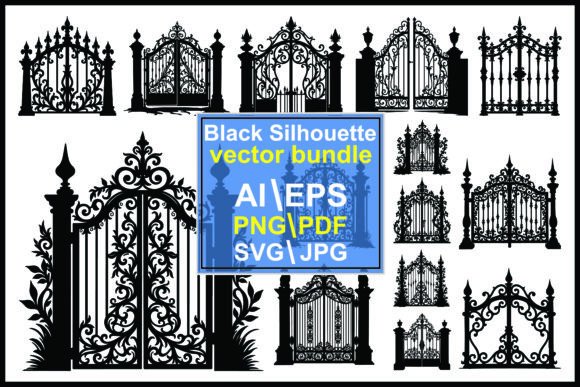
In the realm of architectural design, landscape architecture, and graphic illustration, few elements convey a sense of permanence and elegance quite like wrought iron. The intricate scrollwork, filigree details, and robust structural lines of classic iron gates have long been associated with estates, mansions, and Victorian gardens. For designers, architects, and creative professionals, capturing this aesthetic digitally requires more than just a photograph; it requires precision, scalability, and versatility. This is where a comprehensive collection of wrought iron gates silhouettes becomes an invaluable resource.
Understanding the distinction between a standard image and a professional-grade vector silhouette is crucial for anyone looking to integrate these decorative elements into their work. Whether you are designing a luxury real estate brochure, creating a vintage-inspired wedding invitation, or developing a website header for a heritage property, the quality of your assets dictates the final outcome. This article explores the utility of ornate black wrought iron gate silhouettes, compares file formats, and helps you determine when this specific type of digital asset is the right choice for your project.
The Distinct Appeal of Black and White Silhouettes
A silhouette, by definition, is a solid shape showing the outline of an object against a lighter background. In the context of wrought iron gates, the silhouette emphasizes the complex interplay of negative and positive space. Unlike a full-color photograph, which may be distracted by rust, paint chipping, or lighting inconsistencies, a black-and-white silhouette strips the subject down to its purest architectural form. This high-contrast approach highlights the ornamental details—the swirls, spikes, and geometric patterns—that define the character of the metalwork.
Using these silhouettes offers several distinct advantages over photographic alternatives. First, they provide immediate visual clarity. When used as a decorative element in layout design, the stark black shape commands attention without competing with other textual or graphical components. Second, they offer timeless versatility. Because they are devoid of color trends, these classic design elements fit seamlessly into both modern minimalist layouts and traditional, antique-themed compositions. The absence of background noise allows the architectural detail to stand out, making it easier to overlay text or blend with other graphics.
Evaluating File Formats: Why Versatility Matters
When sourcing digital assets, the file format is often as important as the design itself. A high-quality bundle of wrought iron gates silhouettes should not limit the user to a single type of file. Different projects demand different technical specifications. A professional collection typically includes five primary formats: JPG, PNG, AI, EPS, SVG, and PDF, all compressed into a single ZIP file for easy extraction using tools like WinZip or WinRAR.
- JPG (Joint Photographic Experts Group): This is a raster format, meaning it is made of pixels. It is ideal for quick web use or simple documents where editing is not required. However, JPGs do not support transparency, so you will always have a white background. They are also not scalable; enlarging a JPG will result in pixelation and loss of quality.
- PNG (Portable Network Graphics): Like JPG, this is a raster format, but it supports transparency. This is crucial for designers who need to place the gate silhouette over a colored background or a photograph without a visible white box around it. While better than JPG for layering, PNGs still suffer from resolution limits when scaled up significantly.
- AI (Adobe Illustrator) and EPS (Encapsulated PostScript): These are vector formats. This is the most critical distinction for professional work. Vector files use mathematical equations to define lines and shapes, meaning they can be scaled to any size—from a business card to a billboard—without losing any sharpness or detail. AI and EPS files allow you to edit individual paths, change colors, or modify specific parts of the scrollwork and filigree.
- SVG (Scalable Vector Graphics): This is a web-friendly vector format. It is essential for web developers and UI/UX designers who need crisp icons or graphics that load quickly and look sharp on all devices, including high-resolution retina screens. SVGs can be styled with CSS, allowing for interactive effects on websites.
- PDF (Portable Document Format): While often used for documents, PDFs can contain vector data. They are useful for printing proofs or sharing designs with clients who may not have specialized design software but need to view the artwork accurately.
Having access to all these formats in one graphic silhouette vector bundle ensures that you are prepared for any scenario. If you are a print designer, you will rely on AI or EPS. If you are a web developer, SVG and PNG will be your go-to choices. The convenience of a single ZIP file containing all variations saves time and eliminates the need to purchase multiple versions of the same asset.
Comparing Silhouettes to Other Design Approaches
When deciding how to incorporate iron gate aesthetics into a project, designers often weigh silhouettes against other options, such as stock photography, 3D renders, or hand-drawn illustrations. Each approach has its strengths and tradeoffs.
Stock Photography offers realism and texture. You can see the grain of the metal and the depth of the shadows. However, photos are difficult to integrate into clean graphic designs. They require significant editing to remove backgrounds, adjust lighting, and match color palettes. Furthermore, photos are static; you cannot easily change the color of the iron from black to gold or silver without complex masking techniques.
3D Renders provide depth and perspective, making them suitable for architectural visualizations where the gate needs to look photorealistic in a specific environment. However, 3D models are heavy files, require specialized software to manipulate, and are often overkill for 2D graphic design tasks like logo creation or brochure layout.
Hand-Drawn Illustrations offer a unique, artistic touch but can lack the precision and symmetry expected in classical or Victorian architectural elements. Creating intricate metalwork patterns by hand is time-consuming and may not achieve the geometric perfection that vector silhouettes provide instantly.
In contrast, wrought iron gates silhouettes strike a balance between aesthetic appeal and functional utility. They provide the recognizable elegance of ironwork without the baggage of photographic realism. They are lightweight, editable, and infinitely scalable. For projects where the idea of an ornate entrance is more important than the literal depiction of a specific physical gate, silhouettes are the superior choice.
Best-Fit Situations and Use Cases
Identifying when to use these silhouettes can enhance the effectiveness of your design. Here are several scenarios where ornate black wrought iron gate silhouettes excel:
- Real Estate and Property Marketing: For luxury listings, especially those involving historic homes, estates, or mansions, using a gate silhouette as a border or watermark adds a touch of exclusivity and heritage. It signals "grand entrance" without cluttering the page.
- Event Stationery: Weddings, galas, and formal events often utilize vintage or classic themes. A delicate iron gate silhouette can serve as a beautiful frame for invitations, menu cards, or place settings, evoking a sense of romance and tradition.
- Branding for Heritage Businesses: Companies in industries such as law, finance, or high-end hospitality often want to convey stability, history, and trust. Incorporating architectural elements like iron gates into logos or brand patterns can subtly communicate these values.
- Web Design and UI Elements: Using SVG silhouettes for section dividers or headers can add sophistication to a website. The clean lines work well in both dark and light mode interfaces, providing a structured yet decorative break between content sections.
- DIY and Craft Projects: For those using cutting machines like Cricut or Silhouette, SVG files of iron gates can be used to create physical decorations, stencils, or metal art pieces. The vector precision ensures clean cuts and accurate reproduction of the pattern and detail.
Limitations and Decision Factors
While versatile, silhouettes are not a universal solution. If your project requires a realistic depiction of a specific, existing gate—for example, in a historical documentation project or a forensic reconstruction—a silhouette will lack the necessary detail regarding material texture, wear, and three-dimensional depth. In such cases, high-resolution photography or 3D scanning is more appropriate.
Additionally, because silhouettes are flat, they do not convey depth. If the design relies on dramatic lighting or shadow play to create mood, a simple black shape may appear too stark. In these instances, a grayscale illustration with shading might be a better middle ground.
When evaluating a wrought iron gates silhouettes bundle, consider the complexity of the designs. Some collections offer simple, repetitive patterns suitable for borders, while others feature elaborate, standalone gate structures suitable for focal points. Ensure the collection you choose aligns with the scale and intricacy required for your specific application. The ability to edit the vector files is also a key decision factor; if you need to customize the height or width of the gate to fit a specific layout, access to AI or EPS files is non-negotiable.
Ultimately, the value of these digital assets lies in their adaptability. By providing a range of formats from raster to vector, a comprehensive bundle empowers creators to use ornate, antique-style ironwork across a diverse array of media. Whether you are enhancing a digital interface or printing a high-end brochure, understanding the strengths of silhouettes allows you to make informed design decisions that elevate the visual impact of your work.